


CV formatting to house style: which tools really do this?

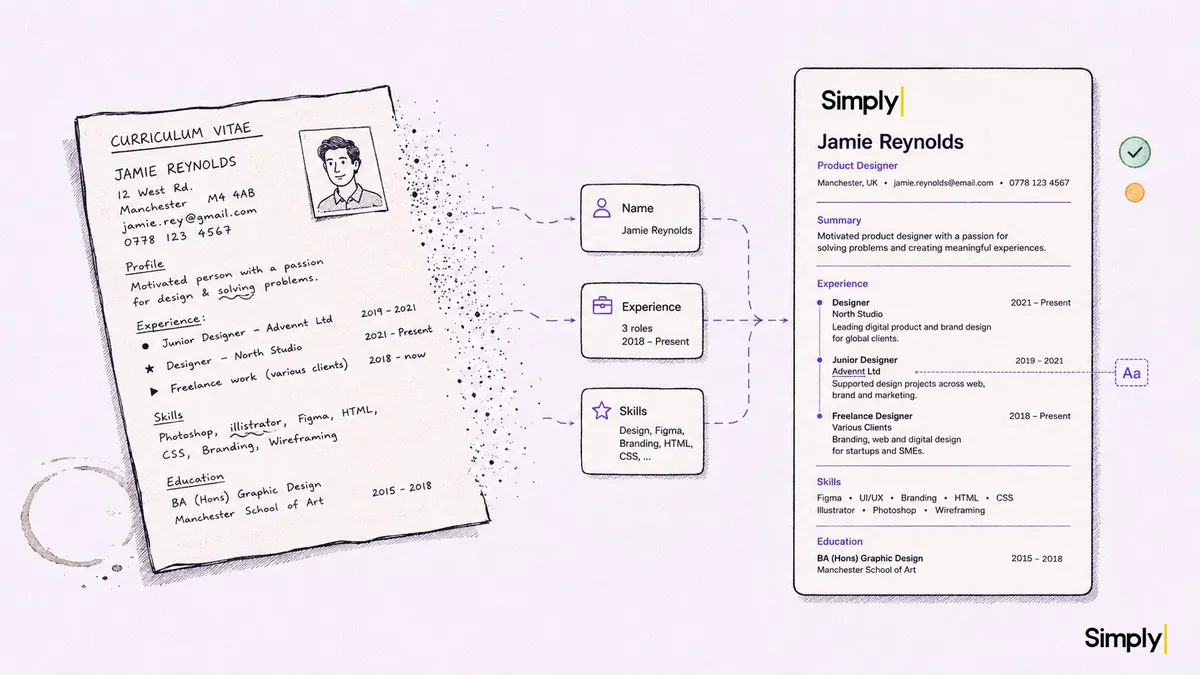
A quick clarification first: in this article "parsing" means extracting data from a CV into fields, and "formatting" means visually rebuilding that CV in your own template. Two different things, often confused.
You know the rhythm. A candidate sends in their CV. It's a Word file in a font nobody at your firm uses, a passport photo that sits crooked, three different bullet styles mixed together, and a sentence that starts with "I am a motivated team player who..." Then that CV has to go to your end client. In your house style. With your logo, your colours, your layout. And without the three typos sitting in the third bullet.
For one CV that's ten minutes of copy and paste. For the two hundred CVs a busy agency processes in a month, it's a job in itself. And this is exactly where a misunderstanding creeps in that costs many agencies money: the assumption that a tool which "processes CVs" also does this. Usually it doesn't.
Parsing versus formatting: not the same
Let's draw the line sharply, because the market constantly lumps these two together.
CV parsing is data extraction. A tool reads the CV and pulls out structured fields: first name, last name, email, work experience per line, education, skills, languages. Those fields then go into your ATS or CRM. The goal is filling your database without retyping. The output is data, not a document.
CV formatting is something else. Here you take the raw CV and visually rebuild it into the agency's house style. Same font as all your other candidate presentations, your logo at the top, your section layout, your colours. And while rebuilding, you correct typos, make the bullets consistent, and strip out the "motivated team player" noise. The output is a new document, ready to send to the end client.
See the difference? Parsing looks inward, toward your system. Formatting looks outward, toward your client. One fills your database, the other makes an impression on the hiring manager.
Many tools only do the first. Specialised parsing vendors are good at it: read a CV and drop the fields neatly into your ATS. That's valuable. But it doesn't hand you a presentation-ready document. That's where the confusion lives. A recruiter buys a "CV tool", sees the data land in the CRM, and then wonders why they're still manually retyping every CV into a Word template before it goes to the client.
Why most AI tools don't do this
Look at the tools that now sit in every recruitment listicle. AI notetakers like Otter, Fireflies, Read.ai, Fathom and Metaview are built around conversations: they record, transcribe, and summarise. They do that well. But CV formatting to house style isn't listed on any of these tools' public product pages. It simply isn't their domain.
That makes sense. A notetaker lives in the meeting. A CV lives outside the meeting, often arriving before anyone has even spoken. They're two different workflows, and most tools pick one.
Then you have the dedicated CV parsing vendors. They go deep on extraction: pulling fields from a CV with high accuracy, in many languages, and linking that to your ATS. But the same rule applies here: extraction is not the same as reshaping. Whether a specific parsing vendor also offers house-style formatting varies per supplier and is far from always on the product page. So check it explicitly, and ask for a sample output. A tool that "formats CVs" might mean "converts to a neutral standard template", not "converts to your house style with your logo".
This is the point where you, as a buyer, need to keep asking. "Does your tool do CV formatting?" is too vague a question. The good questions are: does it rebuild the CV into my template, with my logo and colours? Does it correct typos during that process? Can I get the same output anonymised too? Do I get back a real presentation document, or a row of fields?
What house-style formatting delivers
Why put energy into this? Four reasons, in order of how often they make the difference.
End-client presentation. The CV you forward is your calling card, not the candidate's. A hiring manager comparing two agencies sees within a second which one sends polished, consistent CVs and which one forwards raw Word exports. That judgement isn't in the content of the CV, it's in the form. Unfair, maybe, but that's how it works.
Brand consistency. When every CV that leaves your agency looks the same, you build recognition. The client sees your logo, your layout, and knows immediately: this came from them. An agency that sends a blue CV one week and a grey Word export the next undermines its own brand without noticing.
Time saved across volume. Ten minutes per CV sounds small. Multiply it by two hundred CVs a month and you're over thirty hours. That's nearly a working week per month going to something no recruiter enjoys and that yields no margin. This is exactly the kind of time drain we recommend as a first pilot domain in choosing recruitment AI per agency type.
Anonymising against bias. More and more clients ask for CVs without name, photo and date of birth, so they assess on skills rather than identity. If your formatting process works from structured fields, anonymising is just a setting on that same process. How that works exactly, and where manual anonymising breaks down, we describe in the article on anonymising CVs in recruitment.
How automated formatting works technically
The trick is in the order. A tool that does real house-style formatting parses first and re-renders afterwards. No copy and paste involved.
Step one: the incoming CV is parsed. Every data point goes into its own field, separate from the original layout. The name sits in a name field, work experience in work-experience fields, skills apart. At that point the CV is no longer a document but a set of structured data.
Step two: that data is re-rendered in your template. Not the old layout with new colours on top, but a fresh document built from scratch out of your house-style template. That's why anonymised and non-anonymised CVs look identical, and why there are no empty photo frames or crooked blank lines. The document is built, not repaired.
Step three: while rendering, the language correction runs along. Inconsistent bullets get aligned, double spaces disappear, and spelling mistakes get fixed. The difference between "responsible for managing a team" and the original "responsable for manage team" is corrected automatically.
This only works if the parsing step is good. Bad extraction means bad formatting. That's why CV parsing and CV formatting hang together: the second can't happen without the first. And the validated data that comes out goes into your CRM data entry at the same time, so you don't do the work twice.

Simply
Simply does both sides of this story, and that's why we draw the distinction so sharply. We're a recruitment intelligence tool, not an ATS. We connect to your existing ATS or CRM and deliver validated data and presentation-ready documents into it.
On the parsing side: every incoming CV is read and the fields go into your CRM with a validation system. Green means the system is confident about a field, orange means "take a look at this one". That keeps the human check where it belongs, without going through every field by hand.
On the formatting side: that same CV is rebuilt in your agency's house style, including language correction. We set up the template with your logo, font and layout once. That custom CV-template branding is a one-time setup fee, after which it runs automatically for every CV. And because the formatting works from structured fields, you get the anonymised variant with the same button.
The result: a CV comes in, and what comes out is finished on both counts. The data sits validated in your CRM, and the presentation document is ready in your house style. No retyping, no separate Word template, no "I'll do the formatting later".
What to look for when choosing
Three things, regardless of which supplier you're evaluating.
Ask for a sample output, not a description. "We format CVs" says nothing. Have a supplier convert a raw CV into your house style and look at what comes out. Is it your logo and font, or a neutral standard template? Are the typos gone? Does it look like you could forward it as is?
Check whether parsing and formatting sit in one system. A tool that only parses and a tool that only formats means two integrations, two suppliers, and data going back and forth. A system that does both from the same structured data is less brittle and faster. We wrote earlier about too many separate tools that don't know each other as one of the biggest pitfalls.
Mind the legal layer. A CV is a document full of personal data, and the moment you share it with an end client you're processing under GDPR. Read how to choose GDPR- and EU AI Act-proof recruitment tools. Ask a supplier explicitly about ISO-27001, a data processing agreement, and where your data sits.

